Have you recently moved or gotten a new phone number? Don’t forget to update your personal information with Summit Choice!
Keeping your contact information up to date helps ensure you receive important communications from the credit union and can also help protect your account from fraud.
Update your Information in the Summit Choice Mobile App
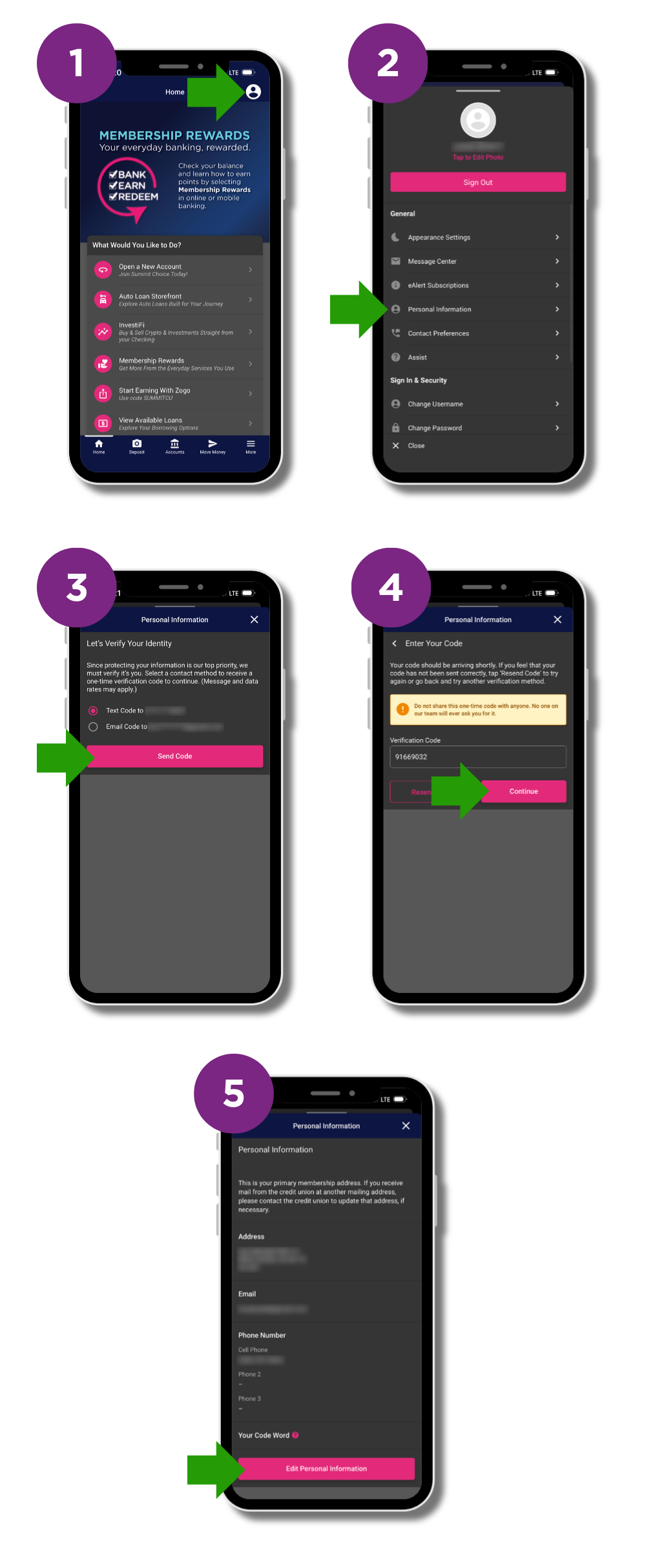
Updating your information is quick and easy:
- Log in to the Summit Choice Mobile App.
- Select your avatar in the top-right corner to access your account settings.
- Select Personal Information.
- Update your address, email address, or phone number as needed.
For your security, changes to your personal information are protected by two-factor authentication. You’ll need to enter a verification code sent to your phone number or email address before making changes.
Update your information in online banking
- Log in to online banking.
- Click the profile dropdown menu in the top-right.
- Click Personal Info & Settings.
- Click Personal Information.
- Select how you would like to receive your security code and click Send Code.
- Enter the security code and click Continue.
- Click Edit Personal Information and update your address, email address, or phone number as needed.
Take a moment to make sure your information is current so we can keep you informed and help keep your account secure! If you have any questions, please contact us at 260-484-2102.